Kita akan menginstall wordpress di ubuntu 22.04. karna kalian sudah klik blog ini, kalian tinggal ikuti aja langkah langkah nya, jika ada yang error kalian cari sendiri. Mandiri boss
WordPress adalah CMS paling populer. Ini adalah sistem manajemen konten gratis dan sumber terbuka yang ditulis dalam PHP dan dipasangkan dengan database MySQL atau MariaDB.
Instal WordPress dengan Nginx MariaDB di Ubuntu 22.04
Prerequisite:
- Server OS Ubuntu 22.04
- User harus root
1. perbarui ke versi terbaru
sudo apt update && sudo apt upgrade -y
2. Install Nginx
sudo apt install nginx -y
Buka port di firewall.
sudo ufw allow 80/tcp

sudo ufw allow 443/tcp
Buka browser ke IP server Anda, maka akan muncul halaman default Nginx.
3. Install MariaDB
sudo apt install apt-transport-https curl -y
Kita perlu mengimpor public key yang digunakan oleh sistem manajemen paket. Kita dapat mengimpornya menggunakan perintah berikut:
sudo curl -o /etc/apt/trusted.gpg.d/mariadb_release_signing_key.asc 'https://mariadb.org/mariadb_release_signing_key.asc'
Sekarang tambahkan repositori menggunakan perintah berikut:
sudo sh -c "echo 'deb https://mirrors.aliyun.com/mariadb/repo/10.11/ubuntu jammy main' >>/etc/apt/sources.list"
Setelah selesai, anda dapat memperbarui dan menginstal MariaDB 10.11 dari repositori MariaDB menggunakan perintah berikut:
sudo apt update -y

sudo apt install mariadb-server -y
Amankan MariaBD menggunakan perintah berikut: ( Opsional, ga digunain juga gapapa).
sudo mysql_secure_installation
Enter current password for root (enter for none):
OK, successfully used password, moving on...

Switch to unix_socket authentication [Y/n] n

Change the root password? [Y/n] y

Remove anonymous users? [Y/n] y

Disallow root login remotely? [Y/n] y

Remove test database and access to it? [Y/n] y

Reload privilege tables now? [Y/n] y
Masuk ke mysql, buat database dan user:
sudo mysql -u root -p
CREATE DATABASE wordpress DEFAULT CHARACTER SET utf8 COLLATE utf8_unicode_ci;
GRANT ALL ON wordpress.* TO 'wordpressuser'@'localhost' IDENTIFIED BY 'password';
FLUSH PRIVILEGES;
exit;
4. Install and configure PHP
sudo apt install php-fpm php-curl php-gd php-intl php-mbstring php-soap php-xml php-zip php-mysqli
Restart php-fpm service:
sudo systemctl restart php8.1-fpm
5. Configure Nginx
Konfigurasikan server Nginx untuk menggunakan nama domain dan Prosesor PHP tertentu. Di sini kita membuat blok server baru.
sudo nano /etc/nginx/sites-available/andriandas.my.id.conf
Note: Ganti andriandas.my.id menggunakan domain anda.
Paste barisan berikut:
server {

    server_name server_domain_name_or_IP;

    root /var/www/wordpress;

    index index.html index.htm index.nginx-debian.html index.php;

    location / {
        try_files $uri $uri/ /index.php$is_args$args;
    }

    location = /favicon.ico { log_not_found off; access_log off; }
    location = /robots.txt { log_not_found off; access_log off; allow all; }
    location ~* \.(css|gif|ico|jpeg|jpg|js|png)$ {
        expires max;
        log_not_found off;
    }
    location ~ \.php$ {
        try_files $uri =404;
        fastcgi_split_path_info ^(.+\.php)(/.+)$;
        fastcgi_pass unix:/var/run/php/php8.1-fpm.sock;
        fastcgi_index index.php;
        fastcgi_param SCRIPT_FILENAME $document_root$fastcgi_script_name;
        include fastcgi_params;
    }

}
Ganti server_domain_name_or_IP menggunakan domain atau ip anda.
Buat tautan simbolik menggunakan perintah berikut:
sudo ln -s /etc/nginx/sites-available/andriandas.my.id.conf /etc/nginx/sites-enabled/andriandas.my.id.conf
Tes konfigurasinya.
sudo nginx -t
Restart Nginx
sudo systemctl restart nginx
6. Download and Extract WordPress
cd /tmp
sudo curl -LO https://wordpress.org/latest.tar.gz
Ekstrak file untuk membuat struktur direktori WordPress:
udo tar xzvf latest.tar.gz -C /var/www/
Salin konfigurasi wp-config-sample.php ke wp-config.php.
cd /var/www/wordpress/

sudo cp wp-config-sample.php wp-config.php
Ubah kepemilikan menjadi www-data user dan group.
sudo chown -R www-data:www-data /var/www/wordpress/
7. WordPress configuration file
Kita perlu menyiapkan berkas konfigurasi utama WordPress. Kita perlu membuat secret key WordPress. WordPress menyediakan generator yang aman untuk nilai-nilai ini sehingga Anda tidak perlu mencoba mencari nilai-nilai yang tepat sendiri.
Untuk mengambil nilai aman dari generator secret key WordPress, ketik:
sudo curl -s https://api.wordpress.org/secret-key/1.1/salt/
Salin secret key dan tempelkan ke dalam berkas konfigurasi WordPress wp-config.php.
sudo nano wp-config.php
Temukan bagian yang berisi nilai-nilai tiruan untuk pengaturan tersebut.
Akan terlihat seperti ini:
...

define('AUTH_KEY', 'put your unique phrase here');
define('SECURE_AUTH_KEY', 'put your unique phrase here');
define('LOGGED_IN_KEY', 'put your unique phrase here');
define('NONCE_KEY', 'put your unique phrase here');
define('AUTH_SALT', 'put your unique phrase here');
define('SECURE_AUTH_SALT', 'put your unique phrase here');
define('LOGGED_IN_SALT', 'put your unique phrase here');
define('NONCE_SALT', 'put your unique phrase here');

...
Hapus baris-baris tersebut dan tempelkan nilai yang Anda salin dari baris perintah.
Sekarang, kita perlu menambahkan nama database, user, dan kata sandi dalam berkas. Kita juga dapat secara eksplisit mengatur metode sistem berkas ke “langsung”. Seperti yang ditunjukkan di bawah ini:
...

define('DB_NAME', 'wordpress');

/** MySQL database username */
define('DB_USER', 'wordpressuser');

/** MySQL database password */
define('DB_PASSWORD', 'password');

...

define('FS_METHOD', 'direct');
8. Install Certbot
Mari amankan situs web menggunakan SSL. Kita akan menerbitkan sertifikat SSL menggunakan Certbot yang dapat digunakan secara gratis. Gunakan perintah berikut untuk menginstal Certbot:
sudo apt install certbot python3-certbot-nginx -y
Dapatkan sertifikat SSL menggunakan perintah certbot. Plugin Nginx akan mengurus konfigurasi ulang Nginx dan memuat ulang konfigurasinya.
sudo certbot --nginx -d andriandas.my.id
Note: Ganti andriandas.my.id menjadi nama domain anda.
Dengan menjalankan certbot pertama kali, Anda akan diminta memasukkan alamat email dan menyetujui persyaratan layanan.
Pada tahap ini, kita telah berhasil menginstal semua yang dibutuhkan. Sekarang mari masuk ke browser dan mengakses domain.
9. Complete the WordPress Installation
Kita telah menyelesaikan konfigurasi sisi server.
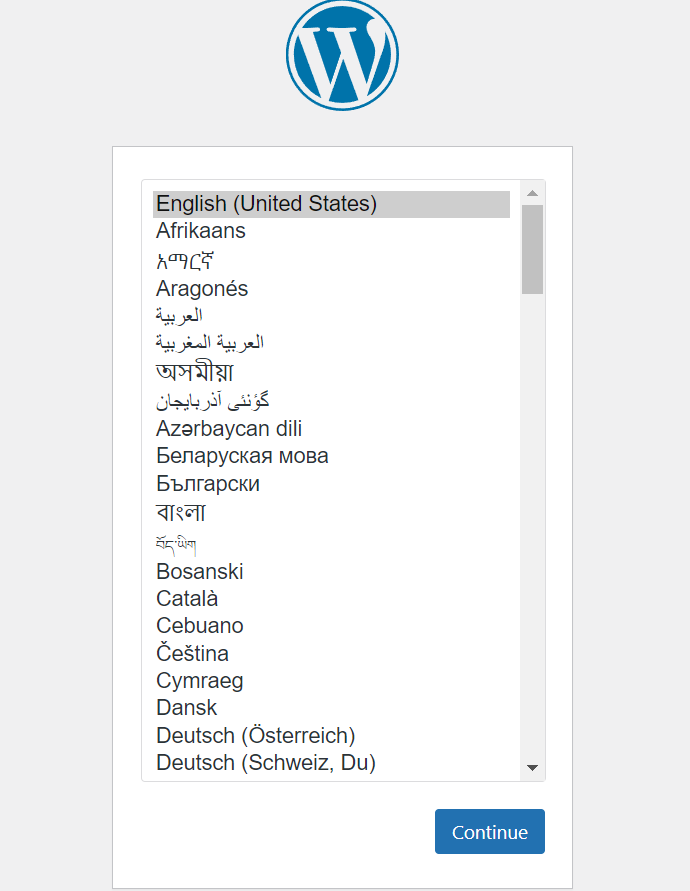
silahkan search ip atau domain anda:
http://server_domain_or_IP